If the UP and DOWN buttons on your remote are reversed, follow these steps to switch them back.
Standard a Single Channel Remote Instructions:

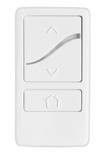
1. Move the shade to a middle position point between the upper and lower limits.
2. Press and hold the UP and DOWN buttons at the same time for 3 seconds. When the remote LED turns amber, release both buttons.
The shade will jog.
3. Press and hold the UP and DOWN buttons at the same time again for 3 seconds. When the remote LED turns amber, release both buttons.
The shade will jog, and the direction has now been reversed.
Was this article helpful?
That’s Great!
Thank you for your feedback
Sorry! We couldn't be helpful
Thank you for your feedback
Feedback sent
We appreciate your effort and will try to fix the article